

Customized Baby Diaper Making Machine: Key Factors to Evaluate Before You Buy
2026-10-24
Finding the right baby diaper making machine isn't just about production speed—it's about tailoring every feature to your specific market demands. From material flexibility to automation level, the wrong choice can quietly eat into your margins. At Womeng, we've seen how a poorly evaluated purchase leads to downtime and waste. This guide breaks down the essential factors you need to weigh before committing, so you can avoid costly oversights and invest in a line that truly fits your operation.
Production Speed Claims vs. Real Shift Output
A machine rated for 1,200 parts per hour rarely delivers 9,600 parts across an eight-hour shift. The marketing figure comes from a clean cycle time with no load pauses, no jam clearing, no tool wear compensation, and no operator repositioning. Shift output starts dropping the moment the first minor stop eats ninety seconds and never really recovers.
Real shift output is built from the gaps between cycles, not just the cycle itself. If a line runs at 95 percent of rated speed but loses four minutes every hour to material replenishment, sensor resets, or waiting on a forklift, the daily count shrinks by more than the downtime suggests. Most plants measure this poorly, logging only big breakdowns while small interruptions accumulate into twenty or thirty percent of the shift.
Experienced production managers stop comparing actual output to the nameplate number and instead track the best repeatable hour from the past two weeks. That benchmark already includes normal operator fatigue, part variation, and the occasional stuck feeder. Chasing the theoretical maximum only pushes people to hide problems, while chasing the demonstrated best hour exposes where the shift is actually leaking output.
Material Waste During Custom Size Changeovers
Custom size changeovers often generate excess offcuts that are difficult to repurpose. Operators must trim standard panels to fit non-standard dimensions, and the leftover strips rarely align with other active orders. Without a clear system for sorting and storing these remnants, they accumulate near cutting stations and eventually end up in the waste stream. This type of material loss is not always obvious on a single job, but it compounds quickly across a production week.
The root issue is that many cutting plans optimize for time rather than material yield. When a machine is set to run a custom size, the software may prioritize the fastest sequence, leaving awkward remnants that cannot be nested into future projects. Over time, these pieces become a hidden cost. Tracking the exact volume of waste per changeover helps reveal patterns—some dimensions consistently create more scrap than others, and adjusting the cutting order or grouping similar custom requests can reduce the loss.
A practical approach is to designate a quarantine area for offcuts above a minimum usable size and review it before each new production batch. Employees can be trained to label remnants with dimensions and material type, making it easier to pull them for small custom orders. Even simple changes, such as scheduling all custom cuts at the end of a shift, prevent clean material from being contaminated with dust and edge banding debris. The goal is not to eliminate waste entirely, but to make it visible and manageable instead of letting it pile up unnoticed.
Spare Parts Availability Before Signing
Checking spare parts availability before signing a contract is one of those steps that looks tedious on paper but turns out to be the difference between a smooth operation and a costly standstill. Many buyers focus heavily on the initial purchase price, delivery schedule, or performance specs, yet overlook whether the supplier can realistically keep the equipment running once it's installed. A machine that sits idle waiting for a critical component can erase any upfront savings within weeks. Before putting pen to paper, ask the supplier to provide hard evidence of their parts inventory, including lead times for items not kept on shelf. If they hesitate or offer vague assurances like “we usually have most things in stock,” treat that as a red flag.
A practical approach is to request a tour of the supplier's local warehouse or distribution center, not just a polished brochure. Look for the specific parts your equipment will need: filters, belts, sensors, control boards, seals. Check whether they carry genuine OEM parts or rely on third-party substitutes, and ask about their emergency shipment options for items that are not locally available. It's also worth speaking with two or three existing customers in your region who have had equipment from the same supplier for at least a year. Their real-world experience with parts wait times will tell you more than any sales presentation ever could.
Finally, don't assume that a signed contract alone protects you if spare parts become a recurring problem. Before signing, negotiate written commitments for parts availability: maximum response times for critical components, minimum stock levels for high-wear items, and penalties or service credits if those commitments are missed. Some buyers even request that a small consignment stock of essential parts be kept at their own facility or at a nearby third-party logistics hub, with the supplier replenishing it as needed. This shifts part of the risk back to the supplier and gives you leverage if issues arise later. In the end, spare parts availability is not a detail to sort out after installation—it's a condition you evaluate, test, and lock down before the contract ever takes effect.
Control Over Customization Settings
Giving users the reins to their own experience starts with granular control over customization settings. Instead of locking people into a one-size-fits-all layout, this approach lets them adjust everything from color schemes and font scaling to notification behavior and widget placement. Each toggle or slider is designed to feel immediate and reversible, so experimentation never carries a penalty.
What sets a thoughtful implementation apart is how it handles the balance between defaults and freedom. Sensible presets get people started quickly, but they aren't treated as sacred. Users can override, reset, or save multiple profiles for different contexts—like a focused work mode versus a relaxed evening setup. The settings themselves are organized by frequency of use, not buried in a technical maze, and every change is previewed in real time.
Crucially, this level of control shouldn't demand a manual. Tooltips appear only when someone lingers, and advanced options stay tucked behind a clearly labeled expandable section. The goal is to make customization feel like a natural extension of using the product, not a separate chore—so that personalizing the interface becomes something people actually enjoy, rather than tolerate.
Operator Training Complexity in the HMI
New operators often hit a wall when they first sit down in front of a modern HMI. The screens look sleek, but beneath the surface there are dozens of soft keys, nested menus, and contextual pop-ups that only make sense after you've seen them in action a few times. One shift isn't enough to build the muscle memory needed to navigate alarm floods or adjust setpoints without fumbling.
The real challenge comes from the gap between classroom training and live operations. A trainer can walk through a slideshow of screen layouts, but that rarely sticks. Operators learn fastest when they're forced to react to a real upset condition, where the pressure of a running process pushes them to remember which button sequence opens the right override. Until a site invests in high-fidelity simulation or on-the-job mentoring, training timelines stretch out and mistakes creep in.
Vendors sometimes make this worse by shipping a one-size-fits-all interface that ignores how an operator actually works. If a level control loop is buried three layers deep but the emergency stop is right next to a commonly used navigation key, the training burden goes up. Simplifying the HMI before rollout—removing unused graphics, grouping related controls, and standardizing color codes—can cut the learning curve more than any extra training module ever will.
Third-Party Safety Proof Over Promises
A safety claim costs nothing to make, which is exactly why it means so little on its own. Third-party proof changes the equation. When an independent lab tests a product, examines the manufacturing process, or audits the supply chain, the result isn't a promise — it's a documented finding. That distinction matters for anyone who has been burned by a confident "trust us" that turned out to be nothing more than words.
Look for names like UL, TÜV, Intertek, or NSF on the label or in the spec sheet. These organizations don't have a stake in whether the product sells; their job is to verify that it meets published safety standards. A real third-party certification includes traceable report numbers, testing dates, and clear scope. If a company can't produce that paperwork quickly, the absence of proof is usually the proof itself.
Savvy buyers stopped accepting assertions years ago. They ask for the certificate, check the lab's accreditation, and compare the test parameters against the actual use case. It's a small amount of extra work that filters out a surprising number of products. In an age where anyone can print a logo on a website, verified safety has become the quiet signal of a supplier that takes its responsibilities seriously.
FAQ
Ask the supplier for actual changeover time, whether quick-change modules let you switch from newborn to XL in minutes, or if it still requires a full shift stoppage. Insist on seeing a video or live demonstration instead of relying on brochure claims.
Not every machine can handle the same material tension or thickness. Request a trial run using your actual roll stock and ask for measured speed, waste rate, and seal strength data. If the supplier can only run their own standard materials, factor in the risk of switching sources later.
Servo count gives a rough idea of how many stations are independently controlled, but more servos does not automatically mean a better line. Focus on whether the configuration actually improves synchronization, reduces mechanical backlash, and makes future product adjustments easier. Have the builder explain which axes are servo driven and why.
Common ones include compressed air and power capacity upgrades, special tools and spare parts, extra dust extraction or waste conveying systems, software license fees, and travel costs for local commissioning. Put these into the total cost of ownership before signing, rather than comparing only the main machine price.
Insist on continuous running tests with your own materials, covering normal speed, start-stop cycles, splice changes, and size changeovers. Ask for records of actual output, downtime reasons, and reject rates, not just a maximum speed under ideal conditions.
At minimum, you need remote diagnostics, recommended stock lists for critical wear parts, operator and maintenance training, and a clear response time for on-site visits. Put software updates and process support fees in the contract, and confirm whether local or regional service engineers are available.
If your output volume and product design are already stable, full customization may fit better. But if you are still testing the market or changing specs often, a standard platform with modular options carries lower risk, shorter lead time, and easier later adjustments. Ask the builder to itemize how each custom feature affects delivery time and price.
Conclusion
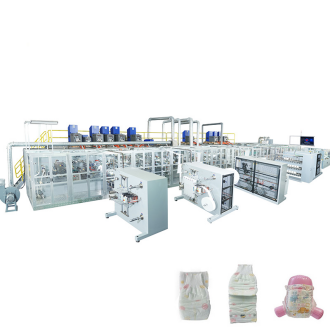
When shopping for a customized baby diaper making machine, the gap between advertised production speed and what you actually get on the floor can be brutal. Don't trust the brochure's maximum cycles per minute—ask for shift-level output data from existing users, because downtime, minor stops, and material changes eat into real productivity fast. Custom size changeovers are another hidden drain: some machines waste entire rolls of nonwoven and film just to dial in a new size, and that scrap adds up quickly across a week of frequent size switches. Look for designs that let you purge short lengths and save the off-spec material for reprocessing, or at least measure the waste per changeover before signing.
Beyond output and waste, spare parts availability deserves a hard look long before you pay. A machine that's down for two weeks waiting on a custom anvil or ultrasonic horn will destroy your delivery schedule. Ask the builder which parts are locally stocked and get lead times in writing. Equally important is how much control you have over customization settings—some HMIs lock you into preset profiles and require factory-level passwords for simple tension or adhesive adjustments, which means every tweak becomes a service call. Operator training complexity is often underestimated; a touchscreen with dozens of nested menus looks impressive but can confuse third-shift staff and lead to inconsistent products. Finally, demand third-party safety proof instead of relying on the manufacturer's own claims. Ask for TUV or CE certificates, or invite an independent safety inspector to review the guarding and interlocks. These checks may feel tedious, but they separate machines that will run reliably for years from those that become expensive lessons.
Contact Us
Contact Person: Jessie Lai
Email: [email protected]
Tel/WhatsApp: 86-188594442931
Website: https://www.wm-machinery.com