

Barcode Wristband Printer Distributor Tips for Reliable Patient Identification
2026-11-16
Hospitals don’t fail patient identification because of a missing policy — they fail when the wristband fades, the barcode smears, or the printer jams at 3 a.m. For distributors, that’s the real conversation: not just selling hardware, but making sure every scan works when a nurse is already overwhelmed. In this guide, we look at practical ways to build a dependable wristband printing setup, from ribbon choices to placement and testing. And if you’re evaluating suppliers, BAOBI has been a quiet workhorse in this category — worth checking when consistency matters more than marketing gloss.
Why Barcode Wristband Print Quality Decides Patient Safety
A barcode on a wristband is not just a convenience; it is the last physical checkpoint between a clinician and a high-risk action. When the print is too light, smudged, or has broken bars, scanners fail at the bedside. That failure rarely stops the workflow. Instead, a nurse may type the patient identifier manually, which introduces exactly the kind of digit transposition or misread that barcoding was meant to eliminate. Over a busy shift, these small workarounds accumulate into wrong-patient medication errors, missed lab draws, or delayed transfusions.
Print quality also has to survive the real conditions of a hospital stay. Wristbands are exposed to hand sanitizer, soap, sweat, friction from bedding, and repeated scanning. Low-resolution prints on the wrong material fade unevenly; edges lose contrast and quiet zones disappear. A barcode that scans on admission may become unreadable by day three, right when a patient’s condition is being reassessed or a new order is added. That timing turns a minor equipment issue into a direct safety risk.
High-quality barcode printing keeps bars sharp, spacing consistent, and contrast high enough for scanners to read on the first pass. It reduces the need for manual override and keeps identification linked to the patient rather than to a workaround. In units where speed matters most—emergency, oncology, pediatrics—print clarity is not a supply-chain detail. It is part of how the hospital prevents harm.
Matching Printer Models to Hospital Workflow Without Overbuying
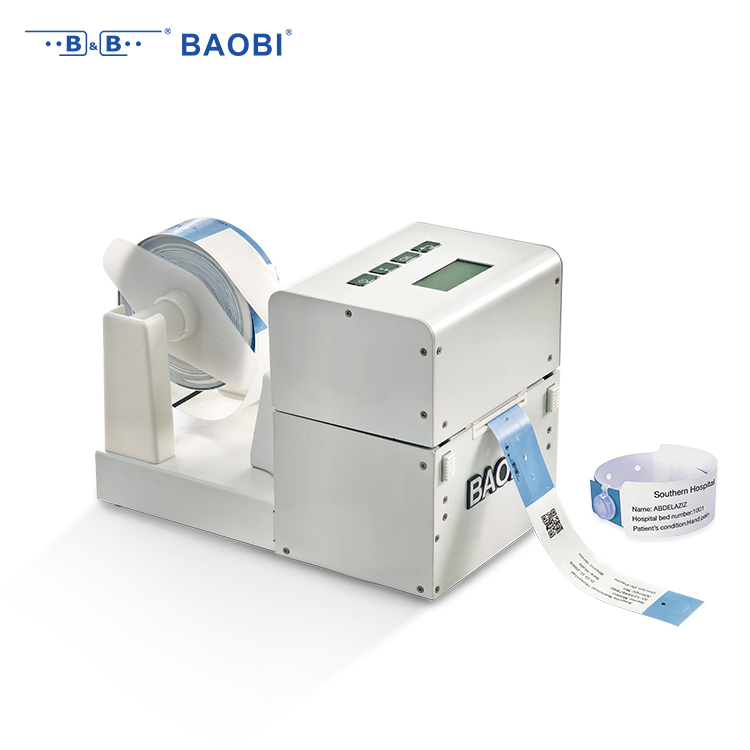
Hospitals often end up with a mismatched printer fleet because purchasing decisions get made by department, by legacy vendor preference, or by copying what another floor already has. That approach fills closets with high-volume multifunction devices in areas that only print a dozen pages a night, while the emergency department may share an undersized desktop unit that jams during a shift change. Matching the model to the workflow starts with a walk-through of where printing actually happens, not where it is convenient for IT to install a device.
Consider what staff are holding when they approach the printer: patient labels, consent forms, medication orders, discharge summaries. A phlebotomy station may need barcode label output that survives refrigeration, while an outpatient registration desk needs reliable scanning and legal-size output for insurance documents. A small thermal or single-function laser printer often fits better than a full floor-standing copier, especially in tight nurse stations. Evaluate duty cycle, first page out time, connectivity with EMR and label software, and whether users can replace supplies without calling biomedical engineering.
Right-sizing does not mean choosing the cheapest unit. It means avoiding the hidden cost of underused features and overbuilt hardware. One hospital may find that three compact duplex printers placed near nursing clusters prevent hallway traffic better than one centralized high-speed device, while still costing less to maintain. Another may discover that a single heavier-duty printer in the pharmacy handles more volume than five scattered inkjets, and eliminates recurring cartridge runs. The goal is to make the printer disappear into the workflow, not become a separate project.
Thermal Media Choices That Keep Wristbands Readable for Days
Not all thermal wristbands survive a weekend festival, a hospital admission, or a week at a resort. The difference often comes down to the face stock and topcoat. A standard paper wristband may look crisp at check-in, but after a shower, a dip in the pool, or constant rubbing against a desk, the print can smear into a gray smudge. Choosing a synthetic or polypropylene-based thermal stock with a protective topcoat keeps the barcode and text legible long after the first day.
For situations where wristbands are expected to stay on for several days, look for media rated for moisture, alcohol, and friction. Direct thermal printing remains convenient, but the thermal layer needs a durable seal to resist hand sanitizer, sunscreen, and sweat. If the application involves heavy abrasion or chemical exposure, pairing a resin-enhanced thermal transfer ribbon with a polyester wristband gives the printed information a much longer life without sacrificing scan speed.
It also helps to match the adhesive and closure to the environment. A band that stays secure and comfortable reduces the wearer’s urge to pick at it, which in turn protects the printed surface. Test a small batch before committing: wear one for three or four days, expose it to water and lotion, and check whether the print remains dark and scannable. The right media choice is usually the one quietly still doing its job on day five.
Distributor Calibration Checks That Prevent Scanning Failures
Most scanning failures blamed on software or drivers actually start with mechanical drift in the scan unit. A distributor calibration check that matters will cover scan head alignment, lamp output, and a full read of the grayscale and color patch targets. When the patch values sit outside the manufacturer’s tolerance, correcting the offset tables and running the test chart again clears many intermittent errors before they reach a customer site.
Paper path sensors and roller pressure deserve the same attention during that visit. Even a slight roller slip can skew the image enough to break barcode or OCR recognition, which often surfaces as a generic scan failure in the field. Recording the calibration values after each adjustment gives distributor technicians a useful baseline, making repeat issues easier to spot and reducing returns for problems that were never true hardware defects.
Training Nurses on Reprint Protocols Before First Use
Before a nurse ever touches a reprint function on a unit printer or label maker, they need a hands-on walkthrough of the exact steps and boundaries. This training shouldn't be a quick video or a PDF attachment buried in an email. It works best when a superuser or charge nurse stands next to the device, walks through a real patient scenario, and lets the nurse press the buttons themselves. Mistakes like pulling a duplicate wristband for the wrong room or reprinting an old medication label almost always trace back to someone who was told the protocol but never practiced it under normal shift pressure.
The pre-use session should cover three specific situations: a faded barcode, a torn label on a specimen tube, and a mismatched patient identifier. For each one, the nurse should demonstrate how to verify the original order, confirm the patient identity with a second identifier, and document the reprint reason in the system. It helps to have a printed one-page cheat sheet taped near the printer, but the training itself should force the nurse to find that sheet, read the exact wording, and apply it while someone watches for skipped verification steps. This creates a habit of checking rather than relying on memory.
Finally, the trainer should deliberately introduce a mistake during practice—such as selecting the wrong encounter or choosing a blank label instead of a patient-specific one—and ask the nurse to catch it before printing. This builds the reflex of pausing before the final click. Sign-off can be as simple as a dated checklist with the nurse's initials and the trainer's name, kept in a binder at the nurses' station. That record becomes the proof that the person was trained on the actual workflow, not just told to read a policy.
Auditing Wristband Output Against Admission Errors
Mismatched wristbands often surface only after a patient has already been routed to the wrong unit or handed another person's meal tray. Auditing the printed output against the admission record means checking more than the name and date of birth; it involves confirming that the medical record number, visit account, allergy flags, and barcode values all match what the registration clerk entered. When a band prints from a cached queue or a duplicate encounter, the text may look right at a glance while the underlying identifier belongs to an earlier visit.
A practical audit pairs every wristband batch with the admissions logged during the same window. Staff can compare the printed quantity, the time stamps on the labels, and the patient identifiers against the registration system's encounter list. Discrepancies such as a band that printed twice for one patient while another patient has none usually point to a workflow issue rather than a printer fault, especially when the admission was updated after the initial order was sent.
Clinicians can also review a random sample at shift change, scanning the barcode with the same device used at the bedside to confirm the encoded data resolves to the current encounter. This catches silent failures like a wristband that prints with correct text but carries a stale barcode, which would otherwise go unnoticed until a medication scan is rejected.
FAQ
A dependable distributor will ask about your patient flow, existing admission system, and label replacement cycle before recommending hardware. They stock thermal printheads and wristband media locally, offer loaner printers during service windows, and can walk your IT staff through driver or firmware updates without escalating every call.
Request sample wristbands printed with your actual barcode symbology and patient data format. Run them through hand sanitizer, water, and a few days of wear, then scan them with the exact scanners used on the floor. A distributor worth keeping will send multiple material options and not just a glossy brochure sample.
Look beyond the device price. Check whether the distributor includes printhead cleaning kits, whether replacement wristbands arrive in predictable lead times, and whether their support team understands healthcare workflows rather than only printer mechanics. Also confirm they can supply wristbands sized for infant, adult, and bariatric use without forcing a separate vendor.
The distributor’s job is not just delivering hardware. They help you standardize ribbon and wristband combinations, tune darkness and print speed so barcodes stay scannable, and keep a documented replacement schedule. That consistency reduces faded or unreadable wristbands that push staff toward manual ID checks.
Ask for a named support contact, average response time for critical printer failures, whether replacement parts are kept in your region, and how they handle recalls or defective wristband lots. A solid distributor will have clear answers and may offer a trial unit on your busiest unit before you sign anything.
Work with the distributor to set minimum stock levels based on your average daily admissions plus seasonal surges. Some distributors offer consignment stock kept on site or automatic shipment triggers when inventory drops. Build in a buffer for emergency department spikes and unexpected downtime so nurses never improvise with non-barcode wristbands.
Patient identification cannot pause while a printer is down. A distributor with regional inventory can ship wristbands or a replacement printer overnight or same day in many areas. They may also send a technician quickly when the issue is mechanical rather than software, which keeps admissions moving without long workarounds.
Conclusion
A wristband that smears after hand sanitizer contact or fades under harsh lighting does more than annoy a nurse—it forces manual identity checks that slow admissions and raise the chance of mismatched records. Distributors should steer hospitals toward thermal transfer or direct thermal materials tested against alcohol exposure, skin oils, and several days of wear, because print quality is not cosmetic. Matching the printer to actual workflow also matters more than offering the fastest or most feature-heavy unit. A busy emergency department with continuous admissions may need a compact, high-duty-cycle model, while a slow orthopedic floor rarely benefits from an overbuilt device with unused RFID encoding. Honest volume and connectivity assessments prevent customers from paying for capacity they will never use.
Calibration is where many scanning failures start. Distributors who perform ribbon tension, printhead pressure, and barcode verifier checks before installation reduce the chance of unreadable wristbands reaching the bedside. That preparation should be paired with a short, scenario-based reprint session for nurses: show them how a duplicate label is generated, why the old wristband must be removed, and when an admission record needs correction instead of a simple reprint. Finally, audit the output against admission logs for a defined period after go-live. Looking at mismatch patterns—wrong date of birth, missing allergy alerts, duplicate MRNs—reveals whether the real problem is printer output, user training, or upstream registration data, not the barcode itself.
Contact Us
Contact Person: Bill Xu
Email: [email protected]
Tel/WhatsApp: 8618688898707
Website: https://www.baobitech.com/